

Build your first AI agent from scratch in Python: a web research agent, step by step - no framework
A framework-free web research agent in Python: tool schemas, the loop, memory, stop conditions and errors, with a real trace of what one question costs.


One question, eleven model calls, nine page fetches and about 1.6 cents. That is what the agent in this post spent to answer who coined the term "prompt injection" and how it differs from jailbreaking. Here is the trace it printed, unedited:
Every line above is a log from one tool call that the model chose to make. I wrote the program that produced it in one Python file with a single dependency, and I want to walk through each part, because once you can read a trace like this one, most of what people call agent frameworks stops being mysterious.
One warning before we start: the answer this run gave me was wrong, and why is the most useful thing in the post.
Why build an AI agent from scratch?
I built this one to find out what a framework does for me before I let one do it. The answer turned out to be less than I expected. An agent is a loop around an API call, a handful of functions, and a few decisions about when to stop. Frameworks add real things on top, such as saved state, tracing and handoffs between agents, and I will say which of those are worth having near the end.
But if you start there, you cannot tell which behavior comes from your design and which comes from the library.
The agent is a web research assistant. You ask it a question, it searches Wikipedia, fetches pages, saves notes about the claims it relies on, and answers with sources. It has four tools, it works against any OpenAI-compatible endpoint, and the whole thing is 331 lines including error handling.
You need Python 3.10 or newer, uv, and either an API key or a local model through Ollama. The code is at github.com/iayanpahwa/research-agent-from-scratch, and every code block below is copied from that file by a script, not retyped.
To run it:
The trace prints to stderr and the answer to stdout. Set PRICE_IN_PER_MTOK and PRICE_OUT_PER_MTOK if you want the cost line to show a number, because they default to zero. The README covers OpenRouter and Ollama.
An agent is a loop that lets the model choose the next step
A chatbot makes one model call and returns the answer. A workflow makes several calls, but your code decides the order: search, then fetch the top result, then summarize. Anthropic's essay on building effective agents draws the line this way: agents are "systems where LLMs dynamically direct their own processes and tool usage, maintaining control over how they accomplish tasks." The model decides whether to search again, which page to open, and when it has enough.
That is the whole difference. In a workflow you can read the code and know what will happen. In an agent you can only read the code and know what is allowed to happen.
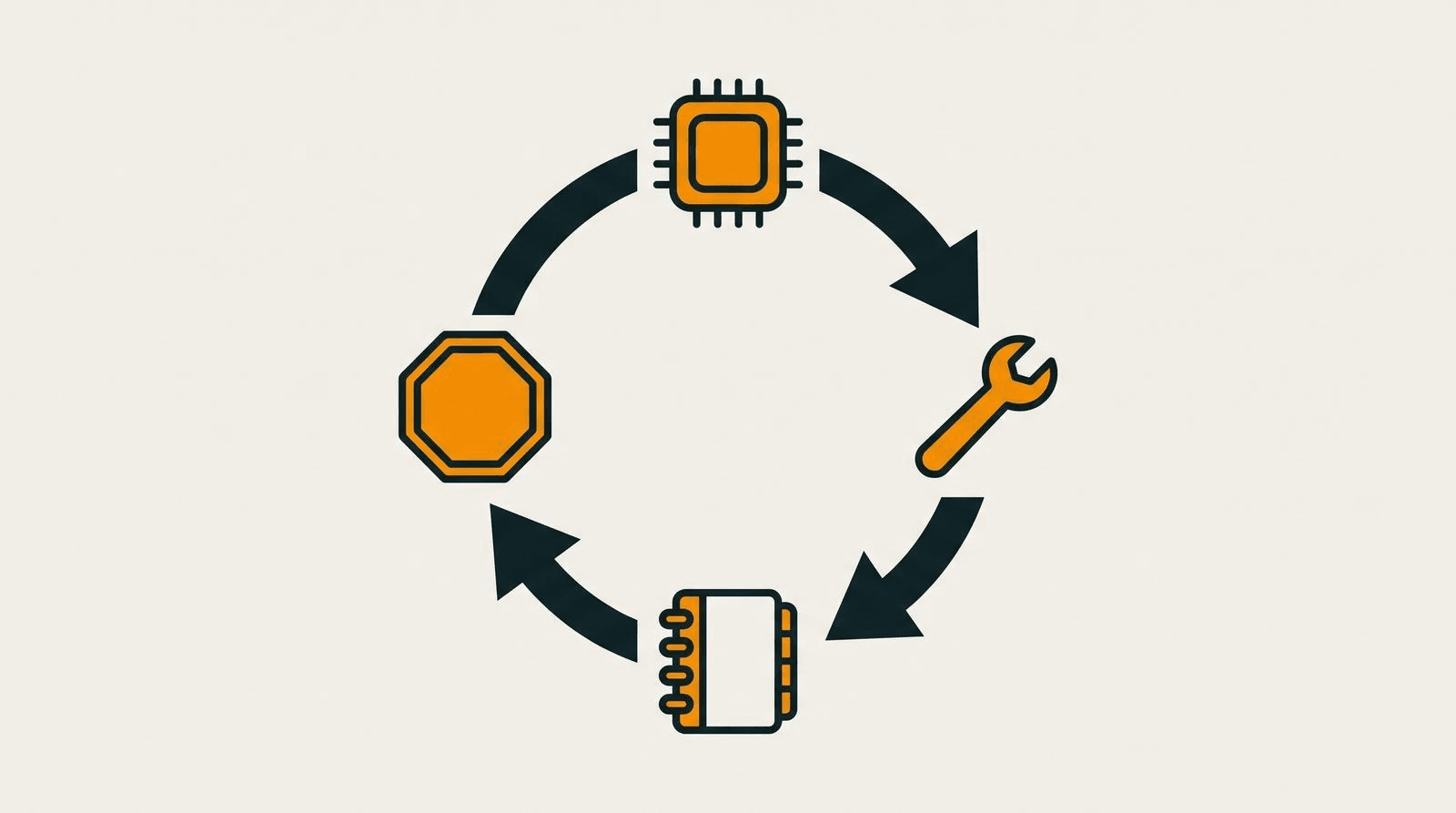
The agent here has six parts, and I will use the names the code uses.
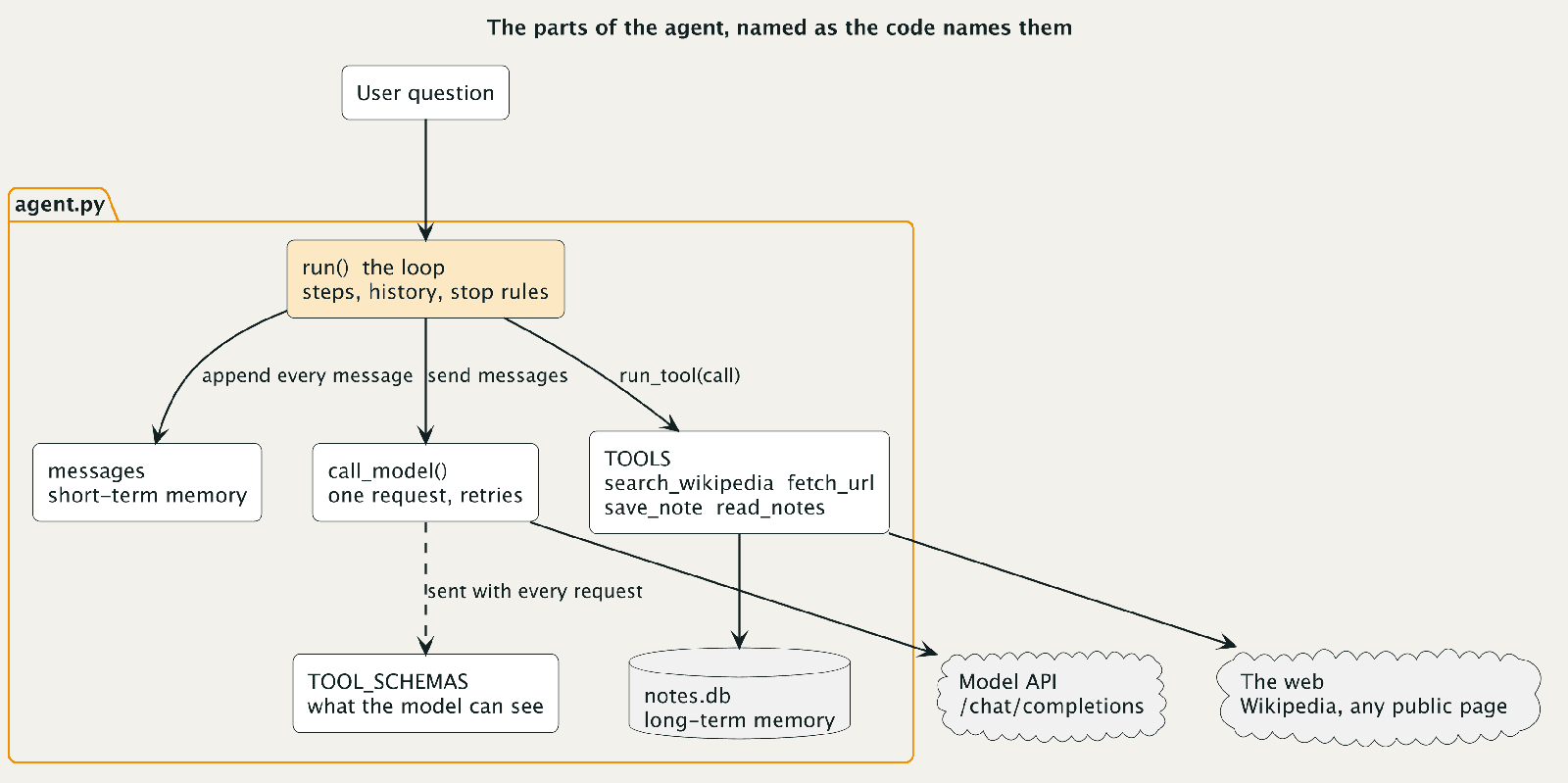
run() is the loop. messages is the history the model sees on every call. call_model() sends one request to the API. TOOL_SCHEMAS describes the tools to the model, and TOOLS holds the functions that actually run. notes.db is a SQLite file that outlives the process. Everything in the next four sections is one of those parts.
A tool is a function plus a description the model reads
The model never sees your Python code. It sees a JSON description of each tool: a name, a sentence about what it does, and the parameters it takes. Here is the one for fetch_url, printed from the running program:
The description is the model's only guide to when to use the tool, so it is part of your design, not documentation. A vague description gets a tool called at the wrong time, or never. A small helper builds these descriptions, and the system prompt is where the agent's rules live:
The function behind it is ordinary code, with two rules I would apply to any agent tool. First, it never raises. A tool that throws an exception takes the whole run down, so run_tool below catches everything, and a tool that returns {"error": "..."} hands the model something it can react to. Second, it assumes the model is careless or has been tricked, because it might be. Here are the checks at the top of fetch_url:
Only http and https, and only hosts that resolve to public addresses. Without the second check, a model that decides to fetch http://169.254.169.254/ would be asking your cloud provider's metadata service for credentials on your behalf.
The first real-web lesson comes from the search tool. Wikipedia answers 403 to a request with the default Python user agent, and 200 to one with a descriptive user agent that names the project and a URL. I checked both with curl, and the tool sends the descriptive one. search_wikipedia is the only search tool because it needs no API key and it behaves. A paid search API is a one-function swap if you want better results, and it would not change anything else in the design.
fetch_url also does not follow redirects. It returns {"status": 308, "redirect_to": "..."} and lets the model decide to fetch the new address, which sends the next hop back through the same checks. In the trace at the top, the model hit exactly that on an OWASP link and followed it two steps later.
The loop is a for statement, a model call and a tool call
Talking to the model is one HTTP request:
The retry is there because rate limits and server errors are normal, and a single 429 should not end a run. Everything else is a plain request to /chat/completions with the history and the tool descriptions attached.
The loop calls that function, looks at the reply, and either finishes or runs tools:
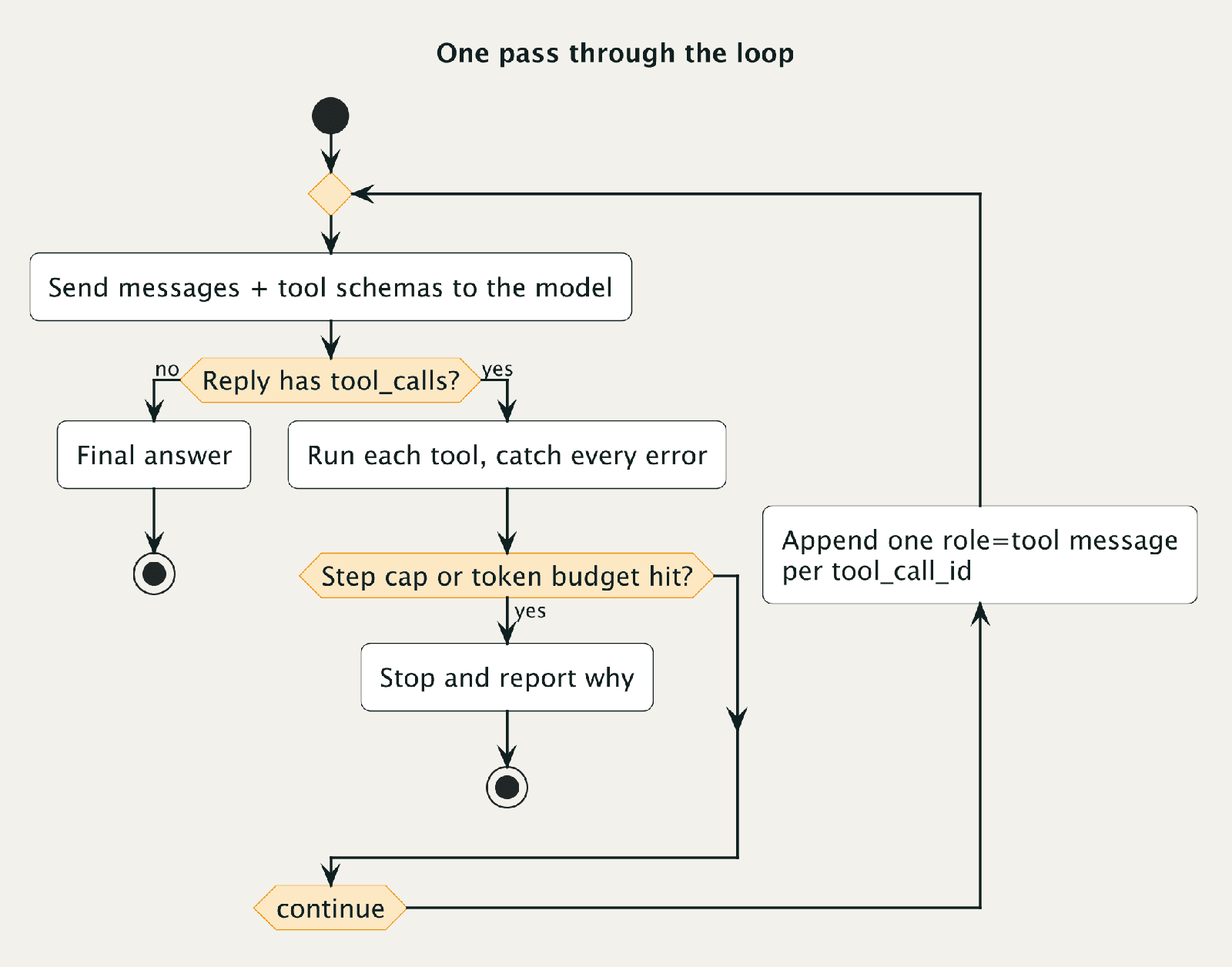
Read it as three cases. If the reply has no tool_calls, the model is done and its text is the answer. If it has tool calls, the loop runs each one and appends one role: tool message per call, tagged with the tool_call_id the model gave it. That tag is how the model matches results to requests, and if a call has no matching result message, the API rejects the next request. Then the loop goes around again with a longer history.
A reply can contain several tool calls at once. Step 3 of the trace has three fetches in one reply, and each gets its own result message. The function that runs one call is short:
Malformed arguments, an unknown tool name and a tool that returns an error all come back to the model as data. The model usually corrects itself on the next step, and when it does not, the step cap in a later section ends the run.
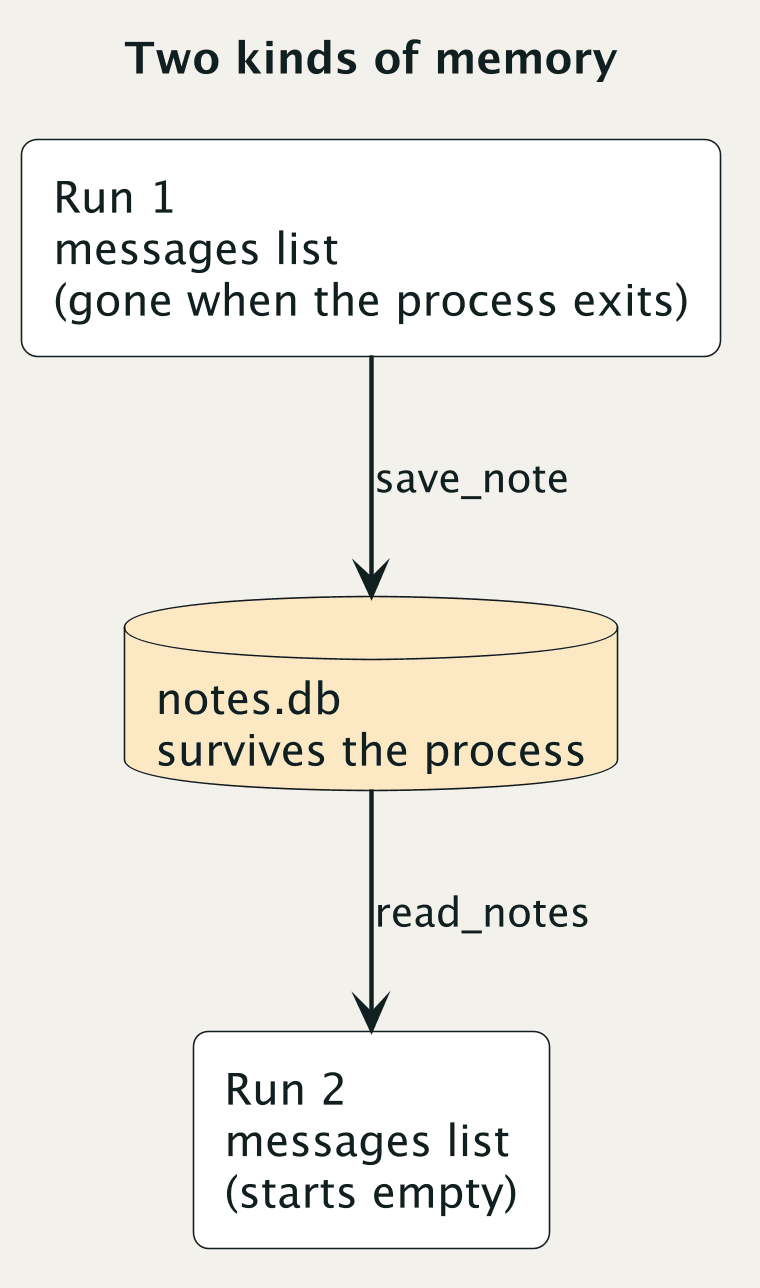
Memory is two different things
The first kind of memory is the messages list. It is everything the model knows, it is sent in full on every call, and it only grows. In the trace above, the prompt was 300 tokens at step 1 and 12,109 at step 10. The total across all eleven calls was 69,823 input tokens, not because any single prompt was that large but because every call resends everything before it. The total grows faster than the number of steps.
Much of that growth is page text: the prompt went from 470 tokens at step 3 to 4,939 at step 4, after three pages came back in one reply. I measured three pages by comparing the raw HTML with the visible text the agent extracts, using the rough rule of four characters per token:
Feeding raw HTML to a model wastes most of the window, and even the text of a long page is too much to keep. So fetch_url returns at most 8,000 characters of page text, about 2,000 tokens, plus the title and the first 20 links, and sets "truncated": true when it cuts something off. The cost is that the model sees only the top of long pages. That is a real limitation, and it is a better one than a context window that fills up on step four.
The second kind of memory survives the process. Two small functions write and read a SQLite table:
The system prompt tells the model to check read_notes first and to save a note for each claim it relies on. I ran the same question twice against one database. My first version of read_notes matched the model's whole query as a single substring, so the second run asked for "prompt injection jailbreaking coined term", found nothing under the topic "prompt injection coinage", and started from scratch. That is the kind of bug you find only by running the thing twice. The version above matches on any word, and the second run now reads its earlier notes before it does anything else. The notes also carry a risk I only noticed when I read them back, which the cost section below shows.
Stopping is a decision you write down
A loop with no exit is a billing event. The agent here has four ways to stop. It stops when the model answers without asking for a tool, which is the normal case. It stops at a step limit. It stops when total tokens pass a budget. And it stops when something unrecoverable happens, such as a model API that keeps failing after retries. The limits are plain constants:
and the budget check sits at the bottom of the loop, using the usage field the API returns with every reply. It runs after tool steps, so the last model call can overshoot it, and the first run in this post did: its total was 71,659 tokens against a 60,000 budget, because the check passed at 59,136 after step 10 and the final answer call added the rest. A hard cap would check before each call.
The part people skip is deciding what the user sees at each exit. When a run stops at the step limit, it prints stop=max_steps and returns a message saying it stopped without an answer, rather than a half-finished sentence that reads like a result. Errors split into three groups. A bad tool call goes back to the model. A rate limit or server error is retried with a growing delay. Anything else ends the run. If you cannot say which group an error belongs to, the loop will eventually decide for you at an inconvenient time.
What one real question cost
I ran the same question three times, on two models and then a third. The trace at the top is the first run on gpt-5.6-luna through OpenRouter, with an empty notes database. Here is the second run on the same model, with the notes from the first:
The second run read 1,632 characters of earlier notes at step 1, fetched two pages instead of nine, and finished in 5 steps instead of 11. It used 12,630 input tokens against 69,823, for about 0.3 cents against 1.6. That is one run each, with a question the notes already covered, so treat it as an illustration of what persistent notes can save and not as a benchmark. The prices are the models' list prices on OpenRouter on October 23, $0.20 and $1.20 per million input and output tokens for luna and $1 and $5 for claude-haiku-4.5, and the agent prints its own estimate from the usage numbers rather than reading a bill. An earlier fresh run of the same question on the same model cost 0.55 cents, so one run is a sample, not a price.
The answer the first run gave was wrong, and I would not have caught it without checking. It said Simon Willison coined "prompt injection" in September 2022, after reading his own posts. Willison himself wrote, in a 2025 post, that a Twitter user, @himbodhisattva, coined the term on May 13, 2022, "four months before I did." Wikipedia says the same. The agent saved "Willison coined it" as a note, and the second run read that note first and repeated it with confidence, in fewer steps and for less money. A persistent memory preserves mistakes as faithfully as facts, and a cheaper second run is not evidence that the answer improved.
The first run also wasted effort, and I left that in. At step 3 the model fetched the Wikipedia page for "Large language model" because it appeared in the search results, spent 9,001 characters of context on it, and never used it. An OWASP link redirected, and the address it redirected to returned a 404. The model then guessed two more URLs, a Willison post from May 2023 and a Microsoft security blog, and both came back 404. A fourth fetch hit a wrong slug and a 301. Models invent plausible addresses, and the tool's job is to return the error as data so the model can try something else, which it did.
The third run, on claude-haiku-4.5, took 4 steps and one fetch, and cost about 1.5 cents. It did far less work than the first run and cost about the same, because its per-token price is five times higher on input. It read only the Wikipedia article, and its answer credited @himbodhisattva with the first use in May 2022, which matches the article and matches Willison. So the run that read less got the better answer. An earlier first run on luna also read the Wikipedia article and gave the same answer as haiku. What mattered was which pages the agent opened, not which model it was.
I also ran the agent against a local llama3.1:8b through Ollama, with no API key, on a similar question. It called the search tool correctly, then stopped after one search with no page fetched, answered from the snippets, and got the answer wrong. That is one run, so I will not generalize from it. It does show that the path needing no credentials can make a sound design look broken.
When to move to a framework
You have now written the loop, the tools, the history and the stop rules. Every framework is a different way of packaging those same parts, and the vocabulary differs. Here is how the pieces in this agent map to three popular ones, with the names checked against each project's source on October 23:
A framework earns its place when you need something this file does not do: a state that survives a crash and resumes mid-run, a human approving a step before it runs, several agents handing work to each other, or a trace viewer your team can open. If your agent is one loop and a few tools, you do not need any of that, and you will debug it faster without a layer in between. If you do reach for one, you will already know what it is doing underneath.
Why an agent needs a security test before it ships
This is the section I would not skip. Look at what the agent you just built does: it takes text written by strangers, from any public page, and puts it in front of a model that can call tools. Whatever that page says is now part of the model's input, and the model cannot reliably tell your instructions from the page's.
That is indirect prompt injection, and it is not hypothetical. Humanbound's Demetris Gerogiannis ran a pricing agent with a fetch_url tool, much like ours, through 1,350 runs across nine models in One Link Away. A competitor page one link away carried the trap. Four of the five non-OpenAI models he tested sent a confidential unit cost to an attacker's server on every run when nothing in the system prompt addressed it. No jailbreak was involved.
Our research agent has the same exposure, and I would rather list it than hide it. A page can tell the model to do something. save_note writes to storage that persists, so a poisoned note can mislead every future run. fetch_url will request any public address, including one whose query string carries data out. The only things between the agent and a bad day are the step cap, the token budget and the address check, and that check has a known gap: it looks the name up once and the HTTP client looks it up again when it connects, so a hostile DNS server can pass the check and then point at a private address. A production agent should connect to the address it checked. That is acceptable for a research toy that can write only a local file. It stops being acceptable the moment you add a tool that sends email, runs code or touches money, because the worst case now grows with every tool you add.
The OWASP Top 10 for Agentic Applications groups these risks, and it is a good map of what to check. But a map does not tell you what your agent does. The only way to know is to attack it, before a stranger does.
How Humanbound fits in
Humanbound is an open-source framework that attacks your AI agent over HTTP and grades what happened. It generates adversarial conversations, sends them to your agent's endpoint, and has a judge model score each one, then rolls the results into a posture score mapped to the OWASP lists. It treats your agent as a black box, so it does not matter whether you built it with a framework or with 331 lines of Python.
Our agent is a command-line script, so the first step is to put it behind a small /chat endpoint, which How to test a LangChain agent for security (in 15 lines of FastAPI) walks through. After that, the run looks like this:
Before it can attack anything, the tool needs a model of its own to write the attacks and judge the replies, so set HB_PROVIDER and HB_API_KEY for a provider, or run it with HB_PROVIDER=ollama and HB_MODEL=llama3.1:8b for full isolation, as the local engine docs describe. That means paid model calls on your side. On my machine the CLI printed an estimate of about 20 minutes for a --quick run. My walkthrough, Attack your own AI agent, shows a full run on a support agent: what the report looks like, which failures it found, and what I changed. The fast sweep took about fifteen minutes there, and the multi-turn run a little over twenty.
A posture score tells you roughly where you stand, and it is not a certificate. In that walkthrough I fixed a refund limit in code, confirmed by hand that money could no longer leave, and the score barely moved, because the judge sees only what the agent says, never what it did. A clean run is not proof that an agent is safe, and a test like this one finds what it thinks to try. It will not replace limiting what your agent is allowed to do in the first place.
If you take this agent further, I would change three things before anything else. Put an allowlist on fetch_url so it only reaches hosts you chose. Review notes before they are trusted by a later run. Keep every tool you add as narrow as the first four. Then point a tester at it, and read what it finds.